Color, made personal
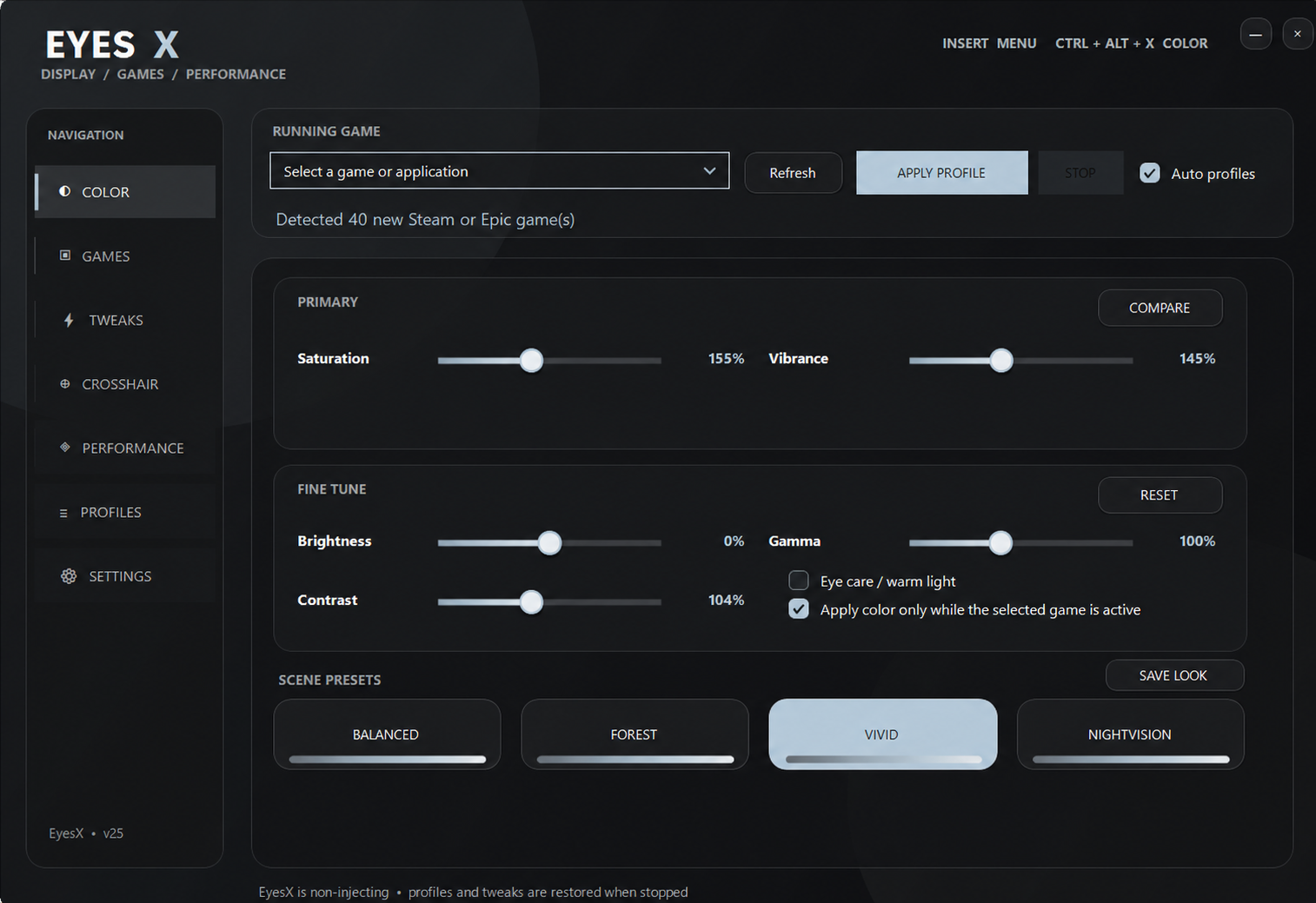
Tune vibrance, saturation, contrast, brightness, gamma, and temperature to create separation that feels right to you.
Windows color-accessibility utility
EyesX is a display-level color and clarity tool shaped by lived experience with color-vision deficiency. Build a comfortable view, save it per game, and keep control of every change.
Free Access build
Version 25.24 restores automatic updates and keeps Apply Profile and Quick Menu in sync.
View the latest EyesX releaseEyesX 25.14 users can update automatically. Version 25.13 users must download manually because that build can crash before checking for updates. Keep your EyesX-data folder to preserve profiles.
SHA-256 A441C853FA63B59A266F6CE9D36ABD287654F8DDEF1F3D405DF34FAB102DFE8C
Built from lived experience
EyesX began as a personal tool for a player with a significant red–blue color-vision deficiency, then grew into something friends could use too. It gives each person room to tune color separation instead of forcing a single “colorblind mode.”
EyesX is an accessibility utility, not a medical device. It does not diagnose, treat, or promise to correct color-vision deficiency. Results differ by display, game, lighting, and individual perception.
Interactive preview
This browser preview demonstrates the purpose of EyesX controls. The Windows app applies its settings at the display level and saves them per game.

What EyesX does
Controls are grouped by outcome, explained in everyday language, and designed to return your PC to its prior state.
Tune vibrance, saturation, contrast, brightness, gamma, and temperature to create separation that feels right to you.
Save a look for each game. EyesX watches only for the selected app to open and restores your normal display when it closes.
Automatically discover supported launchers and installed games, then launch a title with its saved color, display, and performance profile.
Choose a lightweight preset or draw and save your own crosshair. Each option can be enabled only for the game profile that needs it.
A configurable overlay can show FPS, ping, CPU use, and GPU use. Turn each metric on or off and keep only what helps.
Use reversible Windows gaming settings and a memory assistant that identifies high pressure and lets you choose which nonessential apps to close.
Built for your library
EyesX gives every game its own profile instead of forcing one global setting across everything you play.

Visibility for dense environments
Create a profile for forests, snow, deserts, monuments, or night scenes. EyesX can apply your chosen display look when Rust starts and restore the desktop afterward.

Clarity across colorful fights
Tune color separation, brightness, contrast, and gamma for storm edges, loot colors, builds, and fast scene changes without changing Fortnite files.

Accessibility-first review scope
EyesX can detect Riot installations, but no approval is claimed. Until Riot confirms compatibility, do not run EyesX alongside VALORANT. The intended review build is limited to display-level accessibility.
A profile for every executable
Add Steam, Epic, Riot, Xbox, or standalone games to your library. Save a different look for Counter-Strike 2, Apex Legends, Minecraft, Roblox, and other Windows titles.
EyesX matches ordinary Windows processes and visible windows to apply profiles. It does not inject code, read game memory, automate input, or bypass anti-cheat. Publisher policies can change, so competitive-game compatibility should always be confirmed before use.
Technical disclosure
EyesX uses ordinary Windows capabilities. It is built to improve the display and system experience without reaching into a game.
Competitive-game policy
EyesX is designed to remain outside the game process, but every publisher and anti-cheat provider sets its own rules. A feature that is acceptable for Rust or Fortnite may not be permitted for VALORANT, Counter-Strike 2, Apex Legends, or another competitive title.
The safest competitive-game configuration is limited to display-level color accessibility and ordinary launcher detection. Optional crosshairs, performance overlays, game-file changes, automated process closing, and runtime system tweaks should stay disabled unless the game's publisher has clearly permitted them.
VALORANT compatibility is still being presented to Riot for review, and no Riot approval is claimed. Until Riot confirms compatibility, users should not run EyesX alongside VALORANT.
For publishers and product reviewers
A restricted review build can be supplied with only the features intended for the title being evaluated, whether that is a Riot, Epic, Facepunch, Valve, EA, or other PC game.
Display adjustments, game detection, local profiles, startup behavior, and full restoration are documented so reviewers can test each boundary without relying on performance claims.
Publishers can request technical details or a review build through the relevant developer portal. General compatibility questions can also be sent through the EyesX feedback page.
Common questions
No. EyesX is not a medical device. It gives users display controls that may improve personal comfort or color separation, but it does not diagnose, treat, or cure color-vision deficiency.
No. The current product does not request Riot account data and does not use Riot APIs. If that changes, this site and the privacy policy will be updated before release.
No approval is claimed. EyesX is seeking review. Users should not use it with VALORANT unless Riot confirms compatibility.
EyesX can create display-level profiles for Rust, Fortnite, and other Windows games without modifying their files or reading their memory. Because anti-cheat and publisher policies can change, use only the features permitted by each game and disable optional overlays or crosshairs when uncertain.
EyesX checks common Steam, Epic, Riot, Xbox, and standalone installation locations, then matches ordinary process and window information when a game starts. You can also add an executable manually when a title is not discovered.
The Free Access build contacts the activation service only if you enter a developer key. EyesX also requests a signed release manifest when it starts and downloads a verified package only when a newer version is available. Profiles and color settings remain local.